eddie

your baddie teddie since 1983.

Page 5 of 5

iPhone 3G vs iPhone 3GS

iPhone3GS

Source: apple.com

With the annoucement of the iPhone 3GS, many of us wonder what changes the new iPhone brings us. Apple released the new iPhone mainly to address one issue: performance, hence the “S” connotation for Speed. Apple claims that the new iPhone 3GS would be up to 2X faster than the iPhone3G. Physically, you can’t tell the difference between the iPhone3G and iPhone3GS, other than the badge marked on the back of the phone. In order to supply the 2X faster performance as advertised, Apple had revised the hardware with higer performance chips.

First we look at the CPU update. The original iPhone and iPhone 3G use a system on a chip (SoC) from Samsung. The SoC is a custom part and actually has Apple’s logo on the chip. The SoC houses the CPU, GPU and memory for the iPhone.
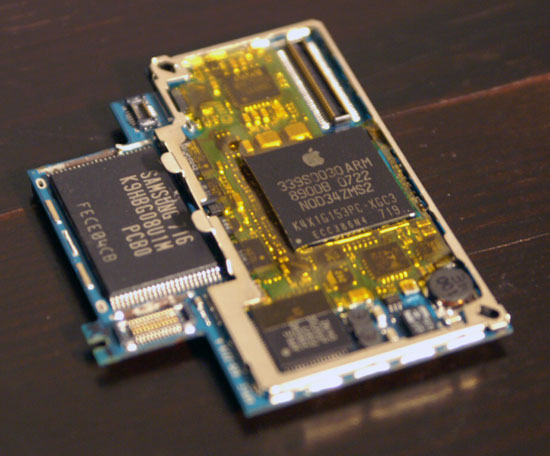
Source: Anandtech

Source: Anandtech

The CPU is based on the ARM11 core, and runs at 412MHz to save power, although the core is capable of running at 667MHz. The ARM11 CPU is a single-issue in-order microprocessor with an 8-stage integer pipeline. You can think of this core as a very high clocked, very advanced 486. And extremely low power. Under typical load, the CPU core should consume around 100mW. By comparison, the CPU in your laptop can require anywhere from 10 – 35W. Idle power is even lower.

Paired with this CPU is a PowerVR MBX-Lite GPU core. This GPU, like the CPU, is built on a 90nm process and is quite simple. The GPU does support hardware transform and lighting but it’s fully fixed function, think of it as a DirectX 6/7 class GPU (Riva TNT2/GeForce 256).

Moving on to the good stuffs..

Sources indicates that the iPhone 3GS uses (again) a Samsung SoC but this time instead of the ARM11 + MBX-Lite combo it’s got a Cortex A8 and PowerVR SGX. If the ARM11 is like a modern day 486 with a very high clock speed, the Cortex A8 is like a modern day Pentium. The A8 lengthens the integer pipeline to 13 stages, enabling its 600MHz clock speed (what I’m hearing the 3GS runs at). The Cortex A8 also widens the processor; the chip is now a two-issue in-order core, capable of fetching, decoding and executing two RISC instructions in parallel.

Show me the graphics

Now that we’re familiar with the 3GS’ CPU, it’s time to talk about the GPU: the PowerVR SGX.

Also built on a 65nm process the PowerVR SGX is a fully programmable core, much like our desktop DX8/DX9 GPUs. While the MBX only supported OpenGL ES 1.0, you get 2.0 support from the SGX. The architecture also looks much more like a modern GPU. The SGX ranges from the PowerVR SGX 520 which only has one USSE pipe to the high end SGX 543MP16 which has 64 USSE2 pipes (4 USSE2 pipes per core x 16 cores). The iPhone 3GS, I believe, uses the 520 – the lowest end of the new product offering.

In its lowest end configuration with only one USSE pipe running at 200MHz, the SGX can push through 7M triangles per second and render 250M pixels per second. That’s 7x the geometry throughput of the iPhone 3G and 2.5x the fill rate. Even if the SGX ran at half that speed, we’d still be at 3.5x the geometry performance of the iPhone 3G and a 25% increase in fill rate. Given the 65nm manufacturing process, I’d expect higher clock speeds than what was possible on the MBX-Lite. Also note that these fill rates take into account the efficiency of the SGX’s tile based rendering engine.

Features and offerings

The iPhone 3G S is available in capacities of 16GB and 32GB – both will be available in black and white. The phone also features a new 3MP camera (now capable of recording 30 fps video) on the back of the device. The iPhone 3G S also has the ability to edit videos directly on the device.

In addition, the new iPhone 3G S promises better battery life (see image to the right) despite the increased processing power. Speaking of processing power, Apple brags about 2x to 3.6x speed performance improvements over a wide range of apps.

Another new addition to the iPhone 3G S is the increase in data transfer speeds from 3.6Mbps to 7.2Mbps

Voice dialing is also coming to the iPhone 3G S – something that most other phones have already had for years. However, the voice commands also extend to other aspects of the iPhone 3GS like “previous track”, “play album” or “play songs by The Killers” within the Music app.

Other new hardware features include a built-in digital compass, Nike+ support, and hardware encryption.

As you may have already surmised, the iPhone 3G S is sporting OS 3.0 which was announced way back in March. iPhone OS 3.0 brings a wealth of new features including long-requested support for copy and paste, MMS, turn-by-turn directions, voice memo recording, Spotlight search, landscape email/notes/messaging, 3G tethering (via Bluetooth or USB), stereo Bluetooth (A2DP), peer-to-peer Bluetooth connectivity, and more. IPhone OS 3.0 will be available to download on June 17 (free for iPhone users, US$9.95 for iPod touch users).

As expected, pricing for the new 16GB and 32GB iPhone 3G S will mirror the prices of the current 8GB and 16GB iPhone 3Gs: US$199 and US$299 respectively. To make things even more interesting, Apple is also discounting the price of the iPhone 3G (8GB model) to US$99 to further expand its user base — the new price is effective today. The iPhone 3G S will be available June 17 in the US. So far, Singtel has not announced availability of the iPhone 3G S. I’m thinking it would take at least a couple of months before it hits our shores. Look out for special promos on the current iPhone 3G. I’m thinking Singtel would want to clear their exisiting stock before the new model arrives. As for Maxis, i’ve pretty much written them off as a viable candidate for anyone to get an iPhone. Their offerings are just not compelling at all.

Putting things in perspective

Combine the power of the the new hardware with the highly optimized software stack of the iPhone and you’ve got the recipe of an extremely fast iPhone. While I’ve yet to play with one, on paper, the 3GS should be every bit as fast as the videos make it seem.

The iPhone 3GS’ performance upgrades should make the phone feel a lot faster, but the real improvement will be what it enables application and game developers to do. Apple recently hired two former AMD/ATI CTOs, presumably to work on some very graphics-centric projects. The iPhone 3GS may be a mild upgrade from a consumer perspective, but what it’s going to enable is far from it; watch out Nintendo. Remember the performance gains we saw in the early days of 3D graphics on the PC? We’re about to go through all of that once more in the mobile space. Awesome.

Sources: Anandtech, Dailytech.

Configuring Virtual Hosting using Apache2 on SLES 10

Originally from: http://www.novell.com/coolsolutions/feature/19856.html

In this guide I tried to explain how to implement Virtual Hosting using Apache2 on SUSE Linux Enterprise Server 10. This guide is ESPECIALLY written for those WEB-ADMINS who are used to configuring Virtual Hosting on Redhat Enterprise Linux(RHEL 3/4). Since on a rhel Server, apache is configured using a single file i.e /etc/httpd/httpd.conf, i.e all of the virtual hosting configurations goes in /etc/httpd/httpd.conf ONLY, while in SUSE Linux Enterprise 10, we don’t edit the httpd.conf for virtual hosting.

What is Virtual Hosting:

Virtual Hosting is the art/method to run multiple websites on a single machine.

Benefits Of Virtual Hosting:

There are millions of websites on the Internet. Without Virtual Hosting it is impossible to run millions of website, because each website requires a dedicated Machine, IP and/or Port as an address to be accessed from across the world/Internet.

Types Of Virtual Hosting:

There are three types of virtual hosting.

  1. IP Based Virtual Hosting (not commonly used)
  2. Port Based Virtual Hosting (not commonly used)
  3. Name Based Virtual Hosting (commonly used)

a. IP Based Virtual Hosting:

    IP based virtual Hosting is the method to run multiple websites on a single machine, but each website must be configured to run on a different/unique IP. To configure the IP base virtual hosting we have to assign multiple IPs to the machine(server).

    Say we have a “Dell Precision 650” machine, to host 3 different websites we must assign 3 unique IP addresses to the machine, and then configure each website to listen on a dedicated IP.

    Advantage:

    Just a single physical machine will host multiple websites, otherwise we need a separate machine to host each website.

    Disadvantage:

    Requires a dedicated IP for each website.

b. Port Based Virtual Hosting:

    • To access the www.test.com, in the url user/surfer has to type the port too, as www.test.com:81
    • To access the www.wxyz.com, in the url user/surfer has to type the port too, as www.wxyz.com:82
    • To access the www.ijkl.com, in the url user/surfer has to type the port too, as www.test.com:83
  • Port base virtual Hosting is the method to run multiple websites on a single machine and even on a single/same IP, but each website must be configured to run on a different/unique Port.

    Say we have a “Dell Precision 650” machine, to host 3 different websites we just need a single dedicated/unique IP-add.

    e.g we have to host www.test.com, www.wxyz.com, and www.ijkl.comon a single machine using single/same IP-addr… we will configure www.test.comto listen on port 81, www.wxyz.comto listen on port 82, and www.ijkl.comto listen on port 83.

    Advantage:

    Just a single physical machine and IP will host multiple websites. No need to purchase multiple machines and IP-add to host multiple websites.

    Disadvantages:

    – It is quite impossible to inform the users/surfers that on which particular port the website is hosted.
    – And user/surfer must has to type the particular port in the url e.g

c. Name Based Virtual Hosting:

    To run multiple websites on a single machine and even on a single/same IP and port, we have to configure the Name-Based Virtual Hosting.

    Advantage:

    A single machine, single IP, and the default http port(80) is used to host several websites.

    Disadvantage:

    Proper DNS configuration will be required to host and access the websites hosted via Name Base Virtual Hosting.

    Note: Since other types of Virtual Hosting(IP and Port base) are not commonly used, thats why we just discuss the Name-Based virtual hosting and used the term “Virtual Hosting” for Name-Based Virtual Hosting.

Step-By-Step Configuration

Configuring Virtual-Hosting using apache2 on SLES 10

  1. First create the Directories and html files for the two websites we host using Virtual Hosting.say e.g
    a1, mkdir /srv/www/example1
    b1, echo "This is the EXAMPLE 1 website" >/srv/www/example1/index.html
    
    a2, mkdir /srv/www/example2
    b2, echo "This is the EXAMPLE 2 website" >/srv/www/example2/index.html
    ********

    After creating directories and html files for the two websites, Now we configure the apache2 to host/run the two websites using virtual hosting.

  2. in /etc/apache2/listen.conf append the following line:
    NameVirtualHost IP_OF_Server:PORT
    i.e
    
    NameVirtualHost 192.168.0.101:80
  3. then change the directory ascd /etc/apache2/vhosts.d

    cp vhost.template example1.conf
    cp vhost.template example2.conf

    NOTE: the virtual host configuration files(in our case example1.conf, and example2.conf) MUST have “.conf” in the end of their names.

  4. Have to change some required parameters as per the environment
    1. Minimal Required Configuration for example1 Websitein /etc/apache2/vhosts.d/example1.conf
      <VirtualHost 192.168.0.101:80> *
      
         ServerName www.example1.org
         DocumentRoot /srv/www/example1
      
         <Directory "/srv/www/example1"> **
            Order allow,deny
            Allow from all
         </Directory>
      
      </VirtualHost>
    2. Minimal Required Configuration for example2 Websitein /etc/apache2/vhosts.d/example2.conf
      <VirtualHost 192.168.0.101:80> 
      
         ServerName www.example2.org
         DocumentRoot /srv/www/example2
      
         <Directory "/srv/www/example2">
            Order allow,deny
            Allow from all
         </Directory>
      
      </VirtualHost>
  5. Restart Apache
    # /etc/init.d/apache2 restart
    or
    # rcapache2 restart

    Now access the websites via your favorite web-browser
    DONE 😉

* If the website is host on the default http port i.e port 80 then its optional to specify the port on rhel, but on a SLES, even the default http port(80) must have to be explicitly specify/define.

** On rhel the Directory Block( <Directory “dir_name”> …</Directory> ) declaration is optional, but on a SLES it is must required within Virtual host Configuration( <VirtualHost IP:Port>…</VirtualHost> ).

SingNet DSL Upgrade.

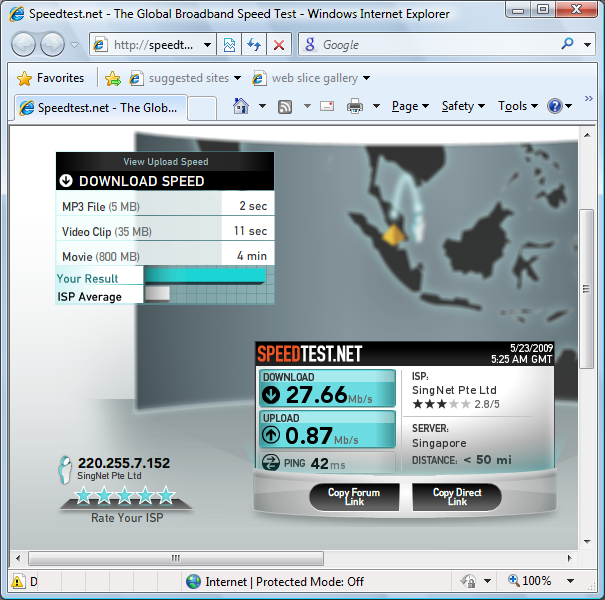
Upgraded my SingNet DSL line from 3M to 10Mbps. Had some teething problems with line packet drops and intermittent disconnection. But all is well after the technician came down and meddled with my phone line. Did a test on Speedtest.net and this is what i got:

OMFG!

Thinking that it might be some erroneous result due to browser, i tried with Google Chrome a second time and got this:

speedtest-google

And then Internet Explorer:

speedtest-ie

WTF?!

Guide: To check modem and DSL line stats

Most modems and routers have the ability to monitor line statistics. Some modems like the SpeedTouch Home, 2Wire, and Cayman have very detailed monitoring while others may only show basic information. If you run a third party router in conjunction with a modem you may have to connect the modem directly to the computer in order to access the modem interface. Good advice: Pull your line stats and save/print all of your previous modem logs before you change anything or troubleshoot.
Although what is monitored and the exact name may be different depending on manufacturer, the overall information is pretty much the same. Most modems will provide upstream (from modem to DSLAM) and downstream (from DSLAM to modem) stats. Below are some common terms and measurements used to judge line quality. Remember these are not hard numbers but simply a generalization of line statistics:

SN Margin (AKA Signal to Noise Margin or Signal to Noise Ratio)
Relative strength of the DSL signal to Noise ratio. 6dB is generally the lowest dB manufactures specify in order for the modem to be able to synch. In some instances interleaving can help raise the noise margin to an acceptable level. Generally speaking, as overall bandwidth increases, your signal to noise ratio decreases. A customer that upgrades from 1.5 to 6.0 (or provisioned with the MaxSync Profile) will typically see a corresponding decrease in the signal to noise ratio. This is normal and nothing to worry about. The higher the number the better for this measurement.

  • 6dB or below is bad and will experience no synch or intermittent synch problems
  • 7dB-10dB is fair but does not leave much room for variances in conditions
  • 11dB-20dB is good with no synch problems
  • 20dB-28dB is excellent
  • 29dB or above is outstanding

Line Attenuation
Measure of how much the signal has degraded between the DSLAM and the modem. Maximum signal loss recommendation is usually about 60dB. One of the biggest factors affecting line attenuation is distance from the DSLAM. Generally speaking, bigger distances mean higher attenuation. The lower the dB the better for this measurement.

  • 20dB and below is outstanding
  • 20dB-30dB is excellent
  • 30dB-40dB is very good
  • 40dB-50dB is good
  • 50dB-60dB is poor and may experience connectivity issues
  • 60dB or above is bad and will experience connectivity issues

DSL Rate
Your provisioned ATM Rate (actual service rate) plus bandwidth to cover the overhead and provisioning of the service.

Attainable Line Rate (AKA Synch Rate)
This is the maximum rate at which your modem can connect to the DSLAM if there was no service provisioning limiting the bandwidth. Anything over 2,000Kbps is considered good. The higher the rate the better. Not all modems have the ability to provide attainable line rate.

Used Line Rate (Speed Touch Home)
Your Used ATM Rate (actual service rate) plus bandwidth to cover the overhead and provisioning of the service. Not all modems have the ability to provide this statistic.

Fast Used ATM Rate
Actual bandwidth at which your service has been provisioned. The actual number can vary a little depending how you are physically serviced. If there is a number here that also means your connection is “fastpath”. Not all modems have the ability to provide this statistic.

Interleaved Used ATM Rate
Actual bandwidth at which your service has been provisioned. The actual number can vary a little depending how you are physically serviced. If there is a number here that also means your connection is “interleaved”. Not all modems have the ability to provide this statistic.

Relative Capacity (AKA Line Capacity)
Percentage of your overall available bandwidth used to obtain your service ATM rate. For example; if your max line synch rate was 5888Kbps and you were provisioned on a 1472Kbps service you would be using 25% capacity. 1472/5888=25% capacity. The lower the relative capacity the better, but you can still get maximum speeds (although a less stable connection) even with a very high relative capacity. In other words you could be synching at 1472Kbps with 98% relative capacity and achieve maximum speeds, but you may experience more disconnects. Not all modems have the ability to provide line capacity.

Output or TX Power
How much power modem (upstream) or DSLAM (downstream) is using. Maximum recommended is about 15dB. The lower the power the better for this measurement. Not all modems have the ability to provide output power.

CRC Errors (Cyclic Redundancy Check)
CRC is a method of detecting errors in data transmission. A high CRC count in itself is not really cause for alarm. However, any increase in CRC errors after your initial connection is established is a problem and usually points to a physical issue somewhere between the modem and the DSLAM. Isolate your inside wiring as a cause by testing from the NID and troubleshoot from there.

Source: DSL Reports

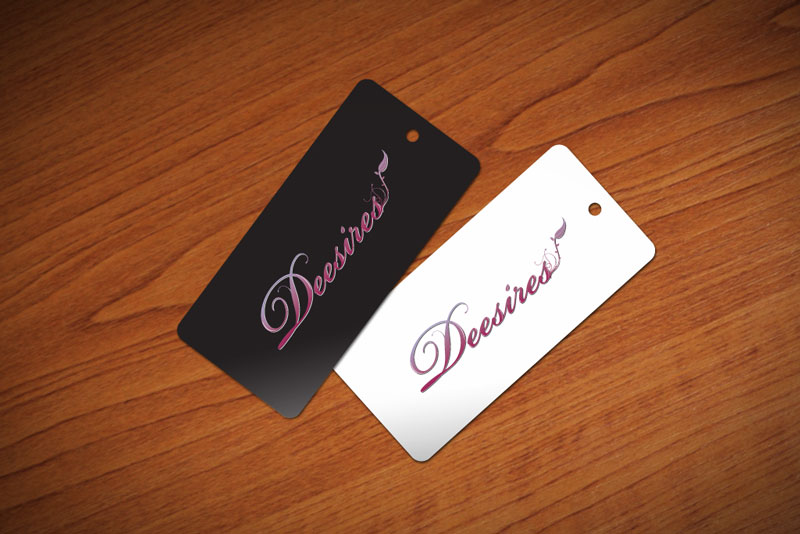
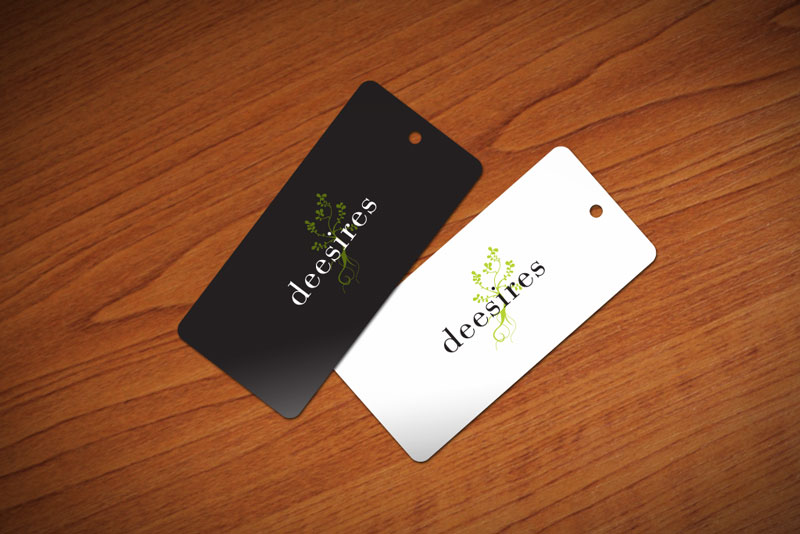
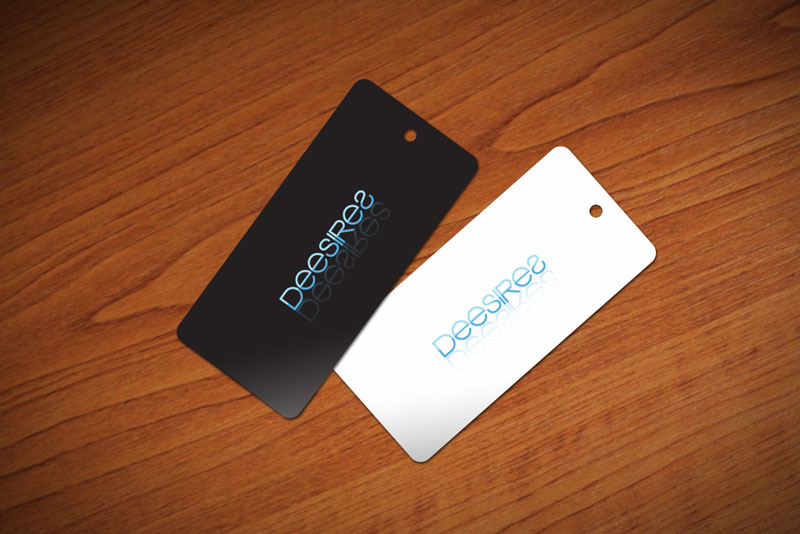
Deesires – Preliminary Logotypes and Visuals

Met Wendy for dinner last Wednesday near her office at Oosters. Mussels from Brussels were quite good. She ordered the damn pot of mussels just to drink the soup can? Still can crazy as ever. Managed to force her to help me with down 3 mussels out of the 10-20, i think.

Anyway, over dinner she talked about how she wanna do this accessories + clothing blog-shop, something that everyone seems to be doing now. Anyway long story short, in the end we decided that we shall combine forces and come out with a label to call our own. She has been using the name “Deesires” since her accessories making days. It’s supposed to be Desires, but because she is Wendy (Wen-dee), she decided to act cute and come up with the name Deesires instead. Apparently it worked pretty well as our label name since my name, Eddie, also ends with the “dee” sound.

Preliminary logo designs and also some visuals. Still finalizing how the label should look. Gotta take a look at Livejournal’s CSS codings as well. Been a while since i touched these things. Am glad i can tap on Jonas’ expertise to assist me.

Logotypes

deesires-logo-01

deesires-logo-01

deesires-logo-2

deesires-logo-2

deesires-logo-3

deesires-logo-3

deesires-logo-4

deesires-logo-4

Visuals

(click to enlarge)

prelim-visual-1

prelim-visual-1

prelim-visual-2

prelim-visual-2

prelim-visual-3

prelim-visual-3

prelim-visual-4

prelim-visual-4

Comments are welcomed.

Desiree and Jam @ NTV7 Star Concert ’08 -《一眼瞬间》

http://www.youtube.com/watch?v=Su8EIcabb4o

Desiree’s duet with Jam Xiao. According to Desiree, her mic was exceptionally soft throughout the most of the song, until the end when the screwed up audio team finally corrected the problem. Even Jam’s 《收藏》had some reverberation in the beginning. I particularly like 《一眼瞬间》, so it’s cool to see Des herself performing it with Jam himself. Could have been better if the mic didn’t cock up.

Better luck next time Des! 😉

You may also check out her first MV 《爱错了吗》here, starring my two friends Zhiming and Xin Jie.

Newer posts »

© 2026 eddie

Theme by Anders NorenUp ↑